
WHEELTOP EDS Troubleshooting Guide: Fix Pairing, Shifting and Battery Problems
Mechanic-tested fixes for WHEELTOP EDS: Bluetooth connection dropouts, noisy or skipping gears, front derailleur rub, charging issues, and stalled firmware updates.
When a WHEELTOP EDS drivetrain acts up, the culprit almost always falls into one of three buckets: a component is asleep or low on charge, the phone is running an outdated app version, or a wheel, cassette, or hanger change has thrown off calibration. Work through the checks below in order; most issues clear up in five minutes without replacing hardware.
1. The App Can't Find or Connect to the Derailleur
Bluetooth pairing issues rarely mean a dead motor. Run through these checks before assuming a fault:
- Wake the derailleur with the magnetic charging cable. New parts ship switched off, and idle units sleep to conserve battery.
- Confirm phone Bluetooth is enabled and keep the phone within a couple feet of the bike.
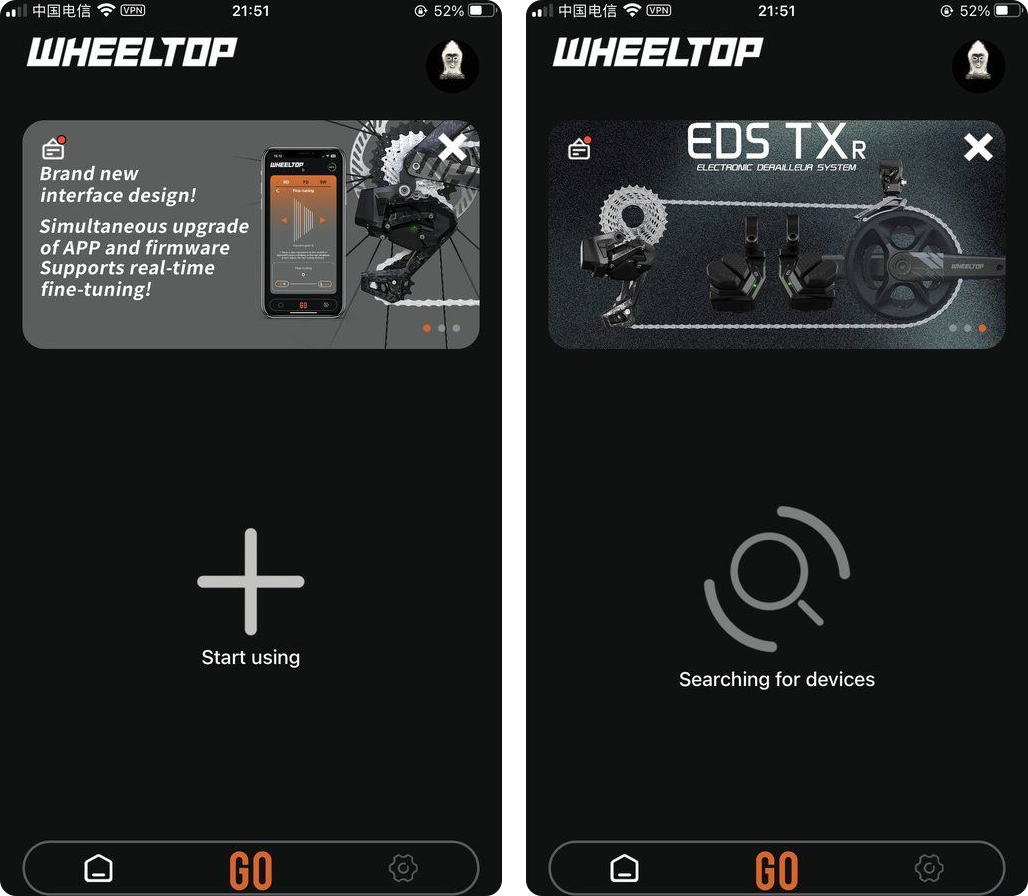
- Check your app version: WHEELTOP v2 uses a dark-and-orange interface. If your app is still blue, update it from the App Store or Google Play first.
- Force-close and reopen the app, then tap Start using to run a fresh scan.
If the component still refuses to appear after a full charge, note the LED blink pattern against our WHEELTOP compatibility & LED reference and reach out with your order number and model.
Video: Pair a Replacement EDS OX Shifter (No Battery Removal)
If a flat-bar shifter stops responding after a crash or you are binding a brand-new spare pod, you do not need to remove the coin-cell battery. Swipe left on the old shifter in the app, tap Replace, and scan the QR code tag on the new shifter. Need a replacement pod? See the WHEELTOP EDS OX 2.0 wireless shifter or browse WHEELTOP replacement parts.
2. Shifting Is Noisy, Slow, or Skips Gears
Always rule out mechanical issues before touching software offsets. Check that the derailleur hanger is dead straight, the rear wheel is fully seated in the dropouts, and the chain is neither worn out nor sized too short. Once the hardware is square, reset indexing in the app:
- Verify that RD → Flywheel settings matches the exact speed count of your cassette.
- Run Initial calibration in the RD tab on the smallest cog while turning the cranks.
- Open Fine-tuning and adjust only the specific gear that clicks or hesitates, one cog at a time.
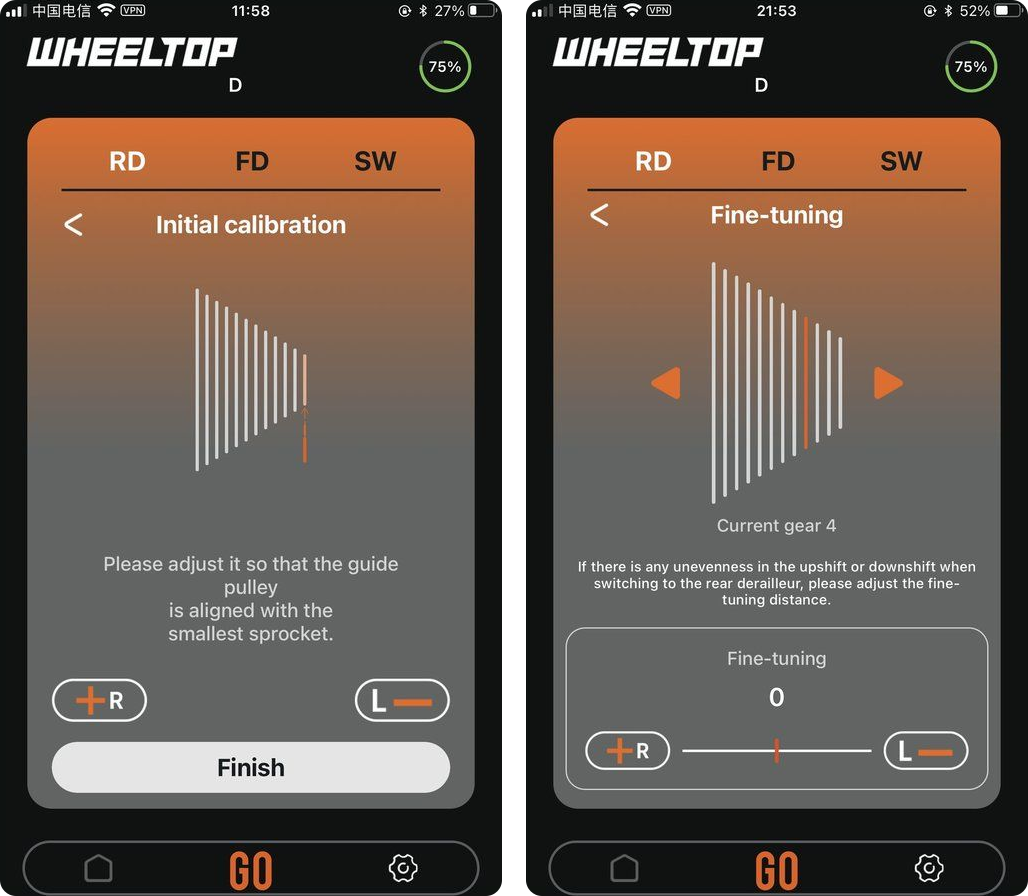
Any time you swap wheels, change cassettes, or straighten a hanger, run a quick recalibration, since even a 0.5mm hub-spacing difference can introduce chatter. For the most frequent bench-setup errors we see, check our WHEELTOP installation common mistakes guide.
Video: Replace a WHEELTOP EDS GeX Rear Derailleur Cage (Step-by-Step)
If shifting went sideways right after a rock strike or bike-bag trip, sight down the pulley cage from behind the bike, because a twisted cage plate will never index cleanly across all gears. You can swap just the cage plate using a 3mm hex key to pull the stop pin, unwind spring tension, undo the lower screw, and mount a fresh plate. Stocked OX 2.0 / GeX cage plates (58mm, 75mm, 93mm) are available under WHEELTOP spare components.
3. Front Derailleur Rubs or Drops Chains (TX)
Always finish rear derailleur calibration first, then switch to the FD tab to calibrate the TX front derailleur. If shifts between rings still feel sluggish or the chain rubs in cross-gears, re-check cage height above the big ring and parallel alignment against our TX installation guide.
4. Battery Drains Fast or Won't Take a Charge
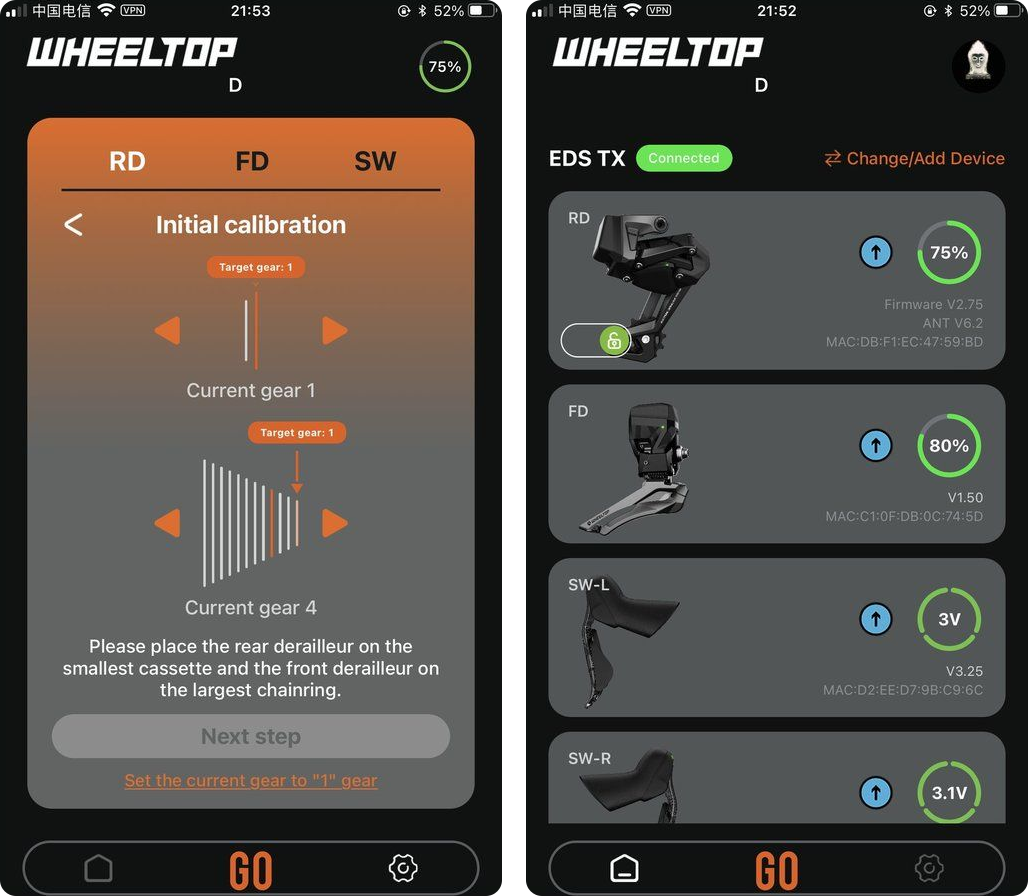
Check live battery levels on the app home screen and make sure you are not leaving the system in Race mode on long storage stretches. When charging, inspect the magnetic pins for grit or moisture; dirty contacts are the main reason a charger fails to seat. OX 2.0, GeX, and TX rear derailleurs use an 800mAh 7.4V (5.92Wh) battery, while the TX front derailleur uses a 500mAh 7.4V (3.7Wh) unit. See our battery life guide for expected runtime, or grab a spare cable or battery in WHEELTOP charging accessories.
5. Firmware Update Stalls or Fails
Make sure the derailleur has plenty of charge, keep your phone right next to the bike, and do not switch apps or let the screen sleep while the progress bar is moving. If an update drops out, force-restart the app, wake the derailleur, and retry. Full steps are covered in our firmware update guide.
When to Contact Support
If an issue persists after charging, updating to app v2, re-pairing, and recalibrating, send us your order number, groupset model, and a short 10-second phone video showing the symptom. Electronic shifting components are covered by our 1-year warranty. See the warranty claim process for what to include.
FAQ
Why does my WHEELTOP derailleur not show up in the app?
It is almost certainly asleep. Snap the magnetic charger onto the contacts for a few seconds to wake it, confirm Bluetooth is on, and tap Start using.
Do I need to recalibrate after swapping wheels?
Yes. Different hubs and cassettes sit slightly differently relative to the dropout, so run Initial calibration and spot-check fine-tuning whenever you change rear wheels.
Why does my app look different from these screenshots?
WHEELTOP redesigned the app in version 2.0 (August 2026) with an orange interface. Update from the App Store or Google Play to match the current screens.
Can I ride WHEELTOP EDS in heavy rain?
Yes, WHEELTOP EDS derailleurs are IP67 rated. Just rinse with low-pressure water after wet rides and dry the magnetic charging contacts before plugging in.
Parts & Replacement Support
Browse full systems and compatible spares for WHEELTOP EDS TX, GeX, and OX 2.0, or pick up a spare OX 2.0 / GeX replacement battery.


